The next PatchWork update is getting closer, and we have a new preview for you to try!
PatchWork V2.79 brings a major upgrade to Macro Controls, along with important compatibility fixes and a number of workflow improvements. Here’s a look at what’s new.
Macro Controls V3

Macro Controls have always been a powerful way to control multiple plug-in parameters at once, and they’ve evolved considerably over the years.
But there were still a few features we wanted to add. You asked for them, and here they are!
Follow Parameter Display
When a macro controls multiple parameters, you can now select one of them as the reference for display and editing. If no reference parameter is selected, PatchWork will continue to display the macro value as 0–100%, just like before.
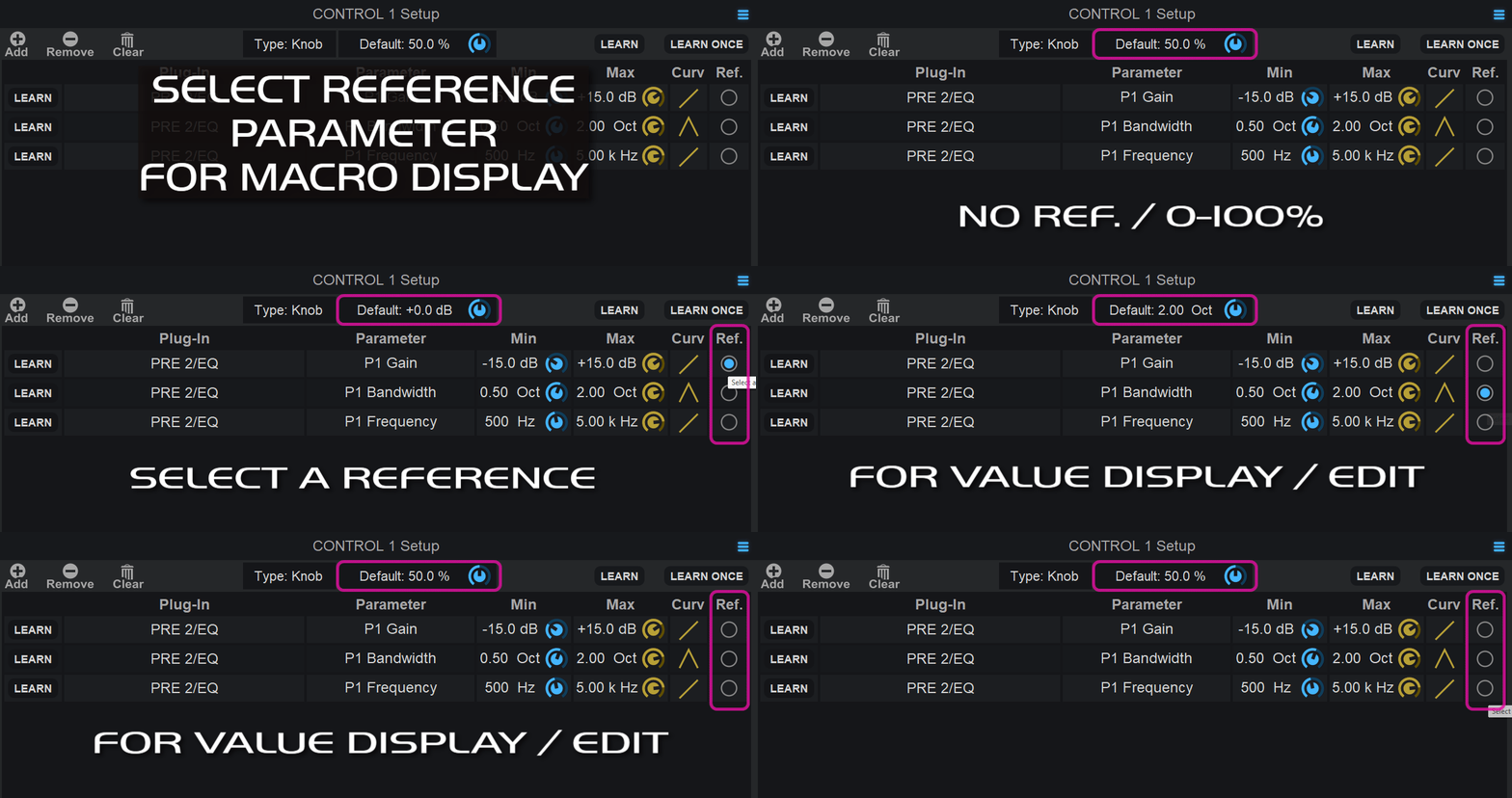
For built-in and most VST3 plug-ins, PatchWork will also automatically use the appropriate number of positions when the target parameter is discrete.
To make the transition as seamless as possible, existing sessions and presets will default to displaying the target parameter’s value when a macro is assigned to a single parameter.
In addition, when assigning macro parameters from the plug-in menu (which is usually the quickest way to map parameters and expose them to the host), the macro’s default value (the value recalled when right-clicking or Alt-clicking a control) will now be retrieved automatically from the target parameter.
This is also the value that will be displayed in the host application’s automation lanes.
Macro Response Curves
You can now define a response curve for each target parameter controlled by a macro, including symmetrical curves that are particularly useful for parameters such as pan and EQ gain:
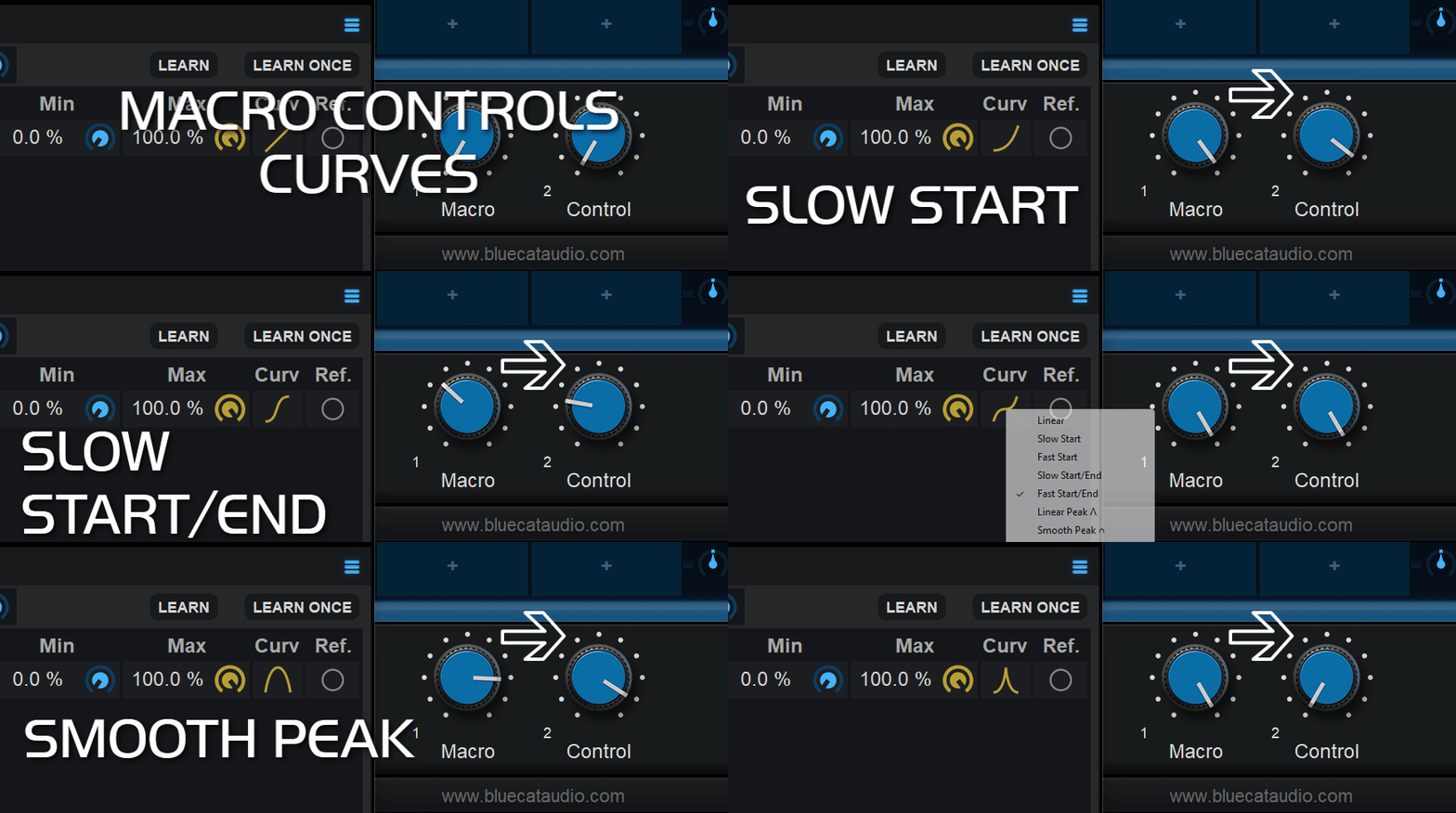
Macros continue to work in both directions: changes made to the macro are sent to its target parameters, while changes made to any target parameter are reflected back to the macro and the other targets. This makes it possible to create powerful macro controls that can simultaneously drive multiple parameters across multiple plug-ins.
Fixes And Compatibility Improvements
Third-party plug-ins and host compatibility are essential for your projects, and it’s an area we pay close attention to. PatchWork 2.79 includes several important fixes:
- Fixed Pro Tools freezing upon stop when using Universal Audio (UAD) Audio Units inside PatchWork.
- Fixed random freeze on Mac when Audio Units loaded inside PatchWork are sending MIDI, and their MIDI output is not assigned.
- Fixed VST3 validation issues in MOTU Digital Performer.
- Fixed crashes when reloading sessions while using a default preset that contains some particular plug-ins of the same type as the ones loaded in the session in the same slot.
- Fixed VST3 output parameters (usually used for meters) not updating for some hosted plug-ins.
- Fixed crash upon exit on Windows when hosting the Native Instruments Komplete Kontrol plug-in.
Other Improvements
The devil is in the details, and some improvements may seem small while making a real difference to your workflow:
- Hitting Esc key now closes the currently focused plug-in Window, as in most host applications.
- Added Connector Protocol V3 support for offline bounce/freeze/render. PatchWork now reports the correct latency when using the Network Audio driver in offline mode, driven by a Connector instance.
- AAX and Audio Unit plug-ins now properly report latency changes when switching from real-time to offline rendering. Some plug-ins may use different latency settings during offline rendering, typically due to oversampling or quality options. PatchWork now reports these changes at the appropriate time, allowing the host to take them into account.
- Improved Undo support for hosted plug-ins, making it more reliable when performing changes inside hosted plug-ins.
Let Us Know What You Think!
Preview versions are usually quite stable at this stage, and the release is getting close, but your feedback is, of course, always welcome!
Feel free to contact us if you run into any issues, or simply let us know if you like the new features! 🙂
Have fun with the new PatchWork preview!