V2.13 (2025/08/12) |
- Fixed Audio Unit registration issues in Logic and GarageBand after using the demo version.
- Improved whitespace stripping to streamline username/key registration.
- Find currently selected preset easily in the menu (folders containing the preset now display a check mark).
- Show current preset in Finder/Windows Explorer.
- Plug-in can now send Bank Select and Program Change messages upon changes in the user interface to keep in sync with external controllers.
- Added an option to cycle next/previous preset in current bank.
- New MIDI "learn once" mode for parameters control (deactivates itself once learned).
|
V2.12 (2024/09/09) |
- Windows: Multi monitor High DPI scaling support for high resolution displays (4K monitors, hi-res laptops...) for Windows 10 version 1607 (Anniversary Edition) and newer.
- Mac: Improved Retina display support, with crispier graphics at all resolutions and zoom levels.
- Mac: fixed random GUI refresh issues in Reaper on Retina displays.
|
V2.11 (2022/12/12) |
- Added Apple Silicon support for AAX Plug-in Format.
- Fixed VST3 version not always loading properly in Ableton Live 11.
- Improved VST parameter value display in some host applications.
- Added an option in global & preset input settings to send MIDI events when MIDI-enabled parameters are modified in the plug-in (to update control surfaces accordingly).
- Improved undo management and automation when using the mouse wheel to move knobs.
- Fixed VST & VST3 automation not recording properly in some hosts for output parameters (Cubase 11, Ableton Live).
- AAX: Fixed erratic mouse behavior in Pro Tools on Mac.
- Mac: installers and plug-ins have been notarized to avoid security warnings on Mac OS Catalina and newer.
|
V2.1 (2021/10/19) |
- Single Installer on Mac (all plug-ins formats).
- Apple Silicon (M1 processor) support.
- Dropped 32-bit support on Mac.
- Now requires MacOS 10.9 and newer.
- Arrow keys can now be used to navigate presets.
- Added MIDI control support (MIDI CC messages) for Next and Previous Preset commands, with MIDI learn.
- Improved MIDI & automation control settings with lock, reset and "save as global setting" capabilities.
- Improved smooth plug-in bypass (faster and smoother transition).
- Unicode support.
- Reduced the number of threads used by the plug-in.
- Reduced memory footprint.
- Windows: improved GUI loading performance.
- VST3: fixed random crash in Ableton Live 11 upon load.
|
V2.0 (2020/11/12) |
DSP:
- Spectrum analysis is now performed in the background and does not affect audio performance at all.
- FFT precision now goes up to 11.
User Interface:
- Refreshed GUI design, with improved usability and touchscreen support.
- The GUI can now be zoomed from 70% to 200%.
- Now supports retina displays on Mac (text and graphs using high resolution).
- Save each memory curve as a file that can be reloaded later as a reference.
- Copy and paste memory curves between instances using the system clipboard.
- Factory and user skins can now be selected directly from the plug-in menu.
- VST: the user interface is now properly resized in Cubase on Windows.
- New installer on Mac.
Presets Management:
- Brand new presets management system.
- Presets can now be selected using MIDI Program change and bank select messages (can be activated with the presets menu/MIDI Program Change item).
- Copy/paste the plug-in's current state from the presets menu using the system clipboard.
Compatibility:
- Now compatible with MacOS Catalina and Big Sur.
- VST3 plug-in format support.
- Audio Suite support for offline analysis in Pro Tools.
- Dropped support for Windows XP and Mac OS X 10.6 and earlier.
- Dropped support for legacy RTAS and DirectX plug-ins formats.
Note: this new version can be installed side by side with the previous version for backward compatibility reasons. Installing this new version won't break your previous projects. |
V1.95 (2014/03/20) |
- Fixed 64-bit VST MIDI Events not sent for the first output parameter in the list.
- Windows VST installer now detects the VST plug-ins path and remembers previous install location for updates.
- Fixed Audio Unit validation issue on OSX Mavericks/Logic Pro X.
- Fixed VST plug-in window frame not showing in Cubase 7.5 (32-bit) on Mac.
- Fixed VST version that could not be loaded in Audio HiJack Pro (Mac).
|
V1.94 (2013/06/27) |
- 64-bit AAX support for Pro Tools 11.
|
V1.94 (2011/07/11) |
- Output data rate (MIDI CC or automation) can now be customized, from 20 to 500 Hz.
- Increased the default output data rate (from 20 to 50 Hz) for smoother side chaining and more precise spectrum display.
- Note value for the current mouse location is now displayed, in addition to the frequency.
- Windows: improved settings dialog loading time.
- Mac: user interface performance improvement (up to 30% lighter on cpu).
|
V1.93 (2011/02/10) |
- Fixed keyboard focus stealing issue in Pro Tools and several other host applications.
- Controls visibility is now persistent.
|
V1.92 (2010/11/29) |
Fixed incompatibility issues with older presets in the previous version. |
V1.91 (2010/11/18) |
- 64-bit Mac VST support.
- User interface enhancements:
- Improved readability.
- Zooming is now animated.
- Controls can be collapsed to reduce the size of the user interface and focus on the analysis.
- Improved consistency with our other analysis tools.
- Improved MIDI and automation output precision: now prevents hosts from wrongly interpolating between values.
- Default release time is now shorter.
|
V1.9 (2010/06/19) |
Performance Improvements (all platforms):
- Improved user interface performance and increased graphs display refresh rate.
- Improved signal processing performance (up to twice faster on some systems!). The plug-in now requires a processor supporting SSE2.
- Reduced memory footprint.
- Faster skin loading.
|
V1.82 (2010/03/19) |
This update only concerns the RTAS version of the plug-in:
- RTAS plug-in bug fix: when using both the mono and stereo versions in the same session, the controls of the instances were linked together.
|
V1.81 (2010/02/25) |
- Demo version now displays a nag screen only once per session, and only when opening the user interface of the plug-in.
- Mac: fixed crash with demo version in Ableton Live 8.1.1.
- Mac AU: output parameters routing now works for more than one instance in Logic Pro's Environment.
- Mac AU: fixed output parameters that could exceed defined range and not record properly as automation curves.
|
V1.8 (2010/02/15) |
- RTAS plugin format support for Pro Tools (Mac and Windows).
- 64-bit applications support for Windows DX and VST under Windows x64.
- Mac AU 64-bit format support (compatible with 64-bit Logic 9.1 on Snow Leopard)
- Fixed MIDI learn issues.
- Space bar does not trigger plug-in buttons anymore (avoids conflict with transport control in most applications).
- Mac: fixed user interface crashes in some hosts under Snow Leopard.
- Mac: fixed keyboard/mouse focus issues in some hosts.
- Mac: fixed user interface crashes in some hosts, when used with particular display settings.
- Mac: fixed multiple screens issue.
- Mac-AU: fixed user interface resizing issue when changing skin in some hosts (Logic).
- Mac-AU: fixed settings lost issue when doing offline rendering in some applications.
|
V1.7 (2009/08/10) |
- New 3D waterfall view to monitor the evolution of the spectrum over time.
- Drag the rulers to move the curve when zoomed (can keep measurement/selection mode and still drag the curves).
- Output automation is now disabled by default.
- Updated documentation.
- Bug Fix (PC): Cubase freezes when loading a preset using a different skin while the plugin window is open.
|
V1.61 (2009/05/05) |
Mac VST update: fixed incompatibility issues with Cubase 5 on Mac. |
V1.6 (2009/02/27) |
- Mac Audio Unit support.
- Improved accuracy of MIDI output.
- Automation output can now be disabled for hosts that do not propose automated parameters choice.
- New Windows Installer (you should uninstall any previous version before installing this new one).
- New documentation format.
|
V1.5 (2008/12/10) |
- Now available for Mac in VST format.
- Added Mid/Side analysis capability.
- Minor user interface changes.
|
V1.4 (2008/02/25) |
- Fixed a crash on certain configurations while opening the global settings window.
- Settings window is now faster to open.
- Minor skin changes.
|
V1.3 (2007/12/13) |
- Improved display refresh rate.
- New "zoom by selection" feature: analysis is now even smoother!
- Spectrum analysis normalization improvement: absolute values comparison with different precision settings is now more accurate.
|
V1.2 (2007/10/18) |
- Undo/Redo.
- Load/Save presets in a host-independent format: you can now share presets between the directX and VST versions.
- New toolbar to access main functionalities.
- Improved skin loading speed.
- Improved user interface performance.
- It is now possible to choose wether displayed curves are filled or not.
- Improved the display of parameters values in the MIDI settings panel and the host application.
|
V1.1 (2007/04/16) |
- Skin loading performance improvement (up to 80% faster).
- Reduced memory consumption when using several instances.
- Offset range has been increased to 80 dB (instead of 40dB).
- Blue Cat's Skinning Language 1.3.1 support.
|
V1.0 (2007/03/05) |
|





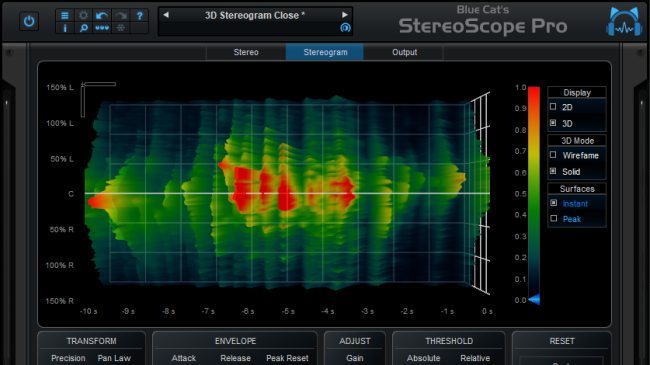
[About 3D View] This looks like a really useful upgrade. Great for analyzing kick vs bass levels.[...] It's pretty awesome, as expected. [...] Was nice being able to zoom in and change the angle. Seeing drum hits in 3D really helps build a mental map of what lies in each bit of the frequency spectrum.
I got a bit lost at one point, with all the zooming and twisting,[...] but then I right clicked it, and it reset, so it's about as perfect as I could've asked for - Alex Mcpherson (novatropic)