



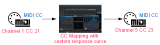
This tutorial shows how to use the Remote Control plugin to map a given MIDI controller on a given channel to a different one, and change its response curve at the same time.
The principle is to use the Remote Control control surface as a MIDI CC mapper:

This tutorial uses Cakewalk Sonar 6 as a host application, but any directX or VST compatible host that supports MIDI routing will work.
Step By Step
01 - On an audio track, insert the Remote Control plug-in:

02 - Open the presets settings window:

03 - In the Input MIDI settings select the source controller and channel (or use the MIDI learn feature):
.png "Step 03 - In the Input MIDI settings select the source controller and channel (or use the MIDI learn feature)")
04 - In the MIDI output settings pane, choose the destination MIDI CC and the response curve:

05 - In the synth rack view, enable the MIDI output:

06 - You can now create two MIDI tracks - The Remote Control plugin assigned as MIDI output on the first one, and input on the other one:

07 - You now have a plug-in ready for CC Mapping, just connect whatever you want to its input and output:

You are now able to remap MIDI CCs thanks to the Remote Control plugin. It may be particularly useful if you have plug-ins or instruments that have MIDI CC numbers that cannot be changed, or if you have controls which response curve do not correspond.
Any questions, comments? You want to submit your own tutorial to win a free license? Please post on our Forum!